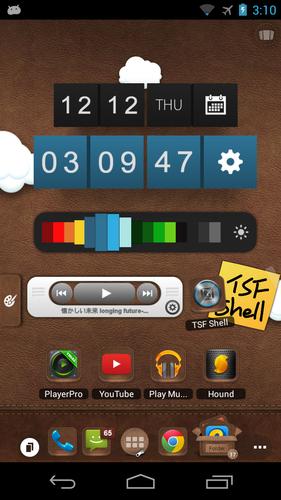
TSF Cube Clock Widget is one of the characteristic TSF 3D widgets
TSF Block-shape Clock Widget is one of the characteristic TSF 3D widgets, it shows the time or date information with spinning block animation effect and users can resize or change its color as they like
Operations:
1. slide the last block to change the display mode (time/date) and the color of the widget
2. on the color setting interface, slide left and right to change the color of the widget; slide up and down the brightness icon to change the brightness.
Notice:
========================
1. This widget must run on the TSF Shell.
TSF Shell download address: https://play.google.com/store/apps/details?id=com.tsf.shell
2 Please rate if you like our application. Please kindly email to [email protected] if you have any query or suggestion on our software.
3.This widget must run on the TSF Shell 2.0+
We are sorry for the inconvenience caused to you.
What's New in the Latest Version 1.3
Last updated on Jun 10, 2015 Version 1.3
1. Fixed some known bugs